Exploring your ideas without ever losing your place
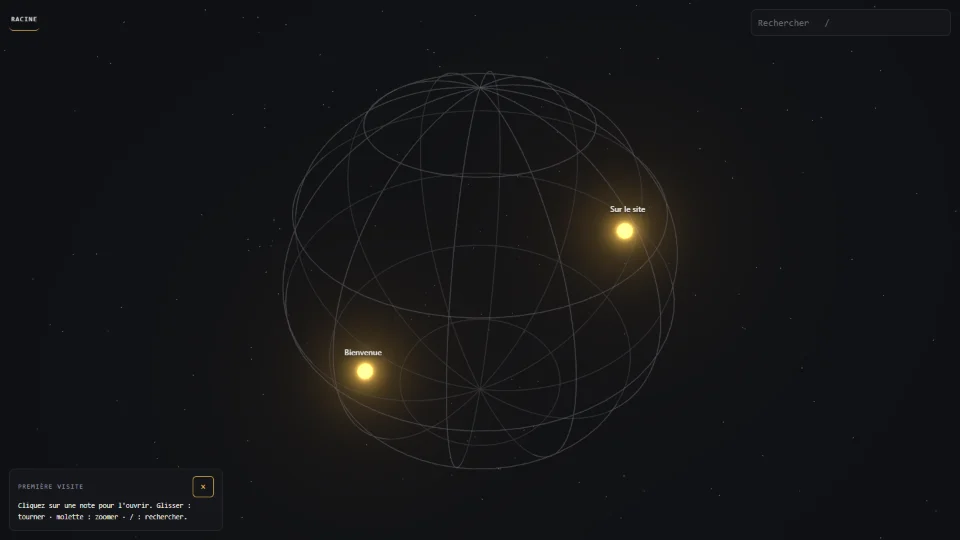
A mind map shaped like a small planet: opening a note makes its sub-notes appear around it, while the bigger picture stays in view.
The need
In most mind-map tools, opening a branch either clutters the screen or sends you to a new page — and you lose track of where you came from.
The idea
Keep the classic tree of ideas exactly as it is — and only change how you move through it.
What I built
- A navigation where each note's sub-notes appear on a small sphere around it, while the parent level stays on screen.
- Gestures chosen for comfort: scroll to zoom, drag to turn, Alt + drag to move the view, and larger touch targets on phones.
- Two earlier versions — a flat drawing, then a 3D one that changed scene at every click — replaced because they made people lose their bearings.
- It also maps the projects of this website automatically, through a small public feed.
The result
- 3navigation designs tried, 1 kept
- 22attempts to get around the editing protection — all blocked
- 2dependencies for the whole project
- 5 Sept 2026online since
The public map is a working demonstration of the navigation. Changes only reach production once the automated tests pass.
In pictures
What I learned
The data barely changed across three versions — only the way of moving through it did. Keeping the two separate let me redo the display twice without touching the data.
Technical details Stack, architecture and decisions — for technical readers
Stack
- Three.js
- Vanilla JavaScript
- Node.js + Express
- SQLite (node:sqlite)
- Cloudflare Tunnel + Access
- systemd
- GitHub Actions
How it works
- A single recursive table, notes(id, parent_id, x, y, title, content), where x and y are a longitude and latitude in degrees on the parent note's globe.
- Three.js is the only library loaded by the browser; about 760 lines of custom JavaScript handle layout, navigation and editing. The camera drives spherical coordinates directly instead of OrbitControls.
- Each child sphere has 0.46 × the parent's radius; the scene graph is never rebuilt while navigating.
- Reading is public; writing is protected upstream by Cloudflare Access, and the service only listens on 127.0.0.1 behind a tunnel. 22 bypass attempts (case changes, double slashes, “..” segments, URL encoding, other HTTP methods) all land on the login page.
- An adversarial review found two real defects, fixed the same day: a JSON parser mounted on every route let an anonymous visitor write into the system log, and a single failed network load froze navigation.
- Continuous deployment from GitHub Actions; production only moves when the test suite passes.
Incidents & fixes
- On phones, taps on the small note markers (6 to 10 px) often missed: a 22 px touch tolerance and preloading the next level took simulated taps from 12/17 to 17/17.
- The glow effect (bloom) was the bottleneck on phones: switching it off there took a multi-level flight from 20 to 37 frames per second.
Still missing
- Editing reserved to me — by design
- Touch gestures still being refined